A Practical Intro to MCP for Frontend Developers
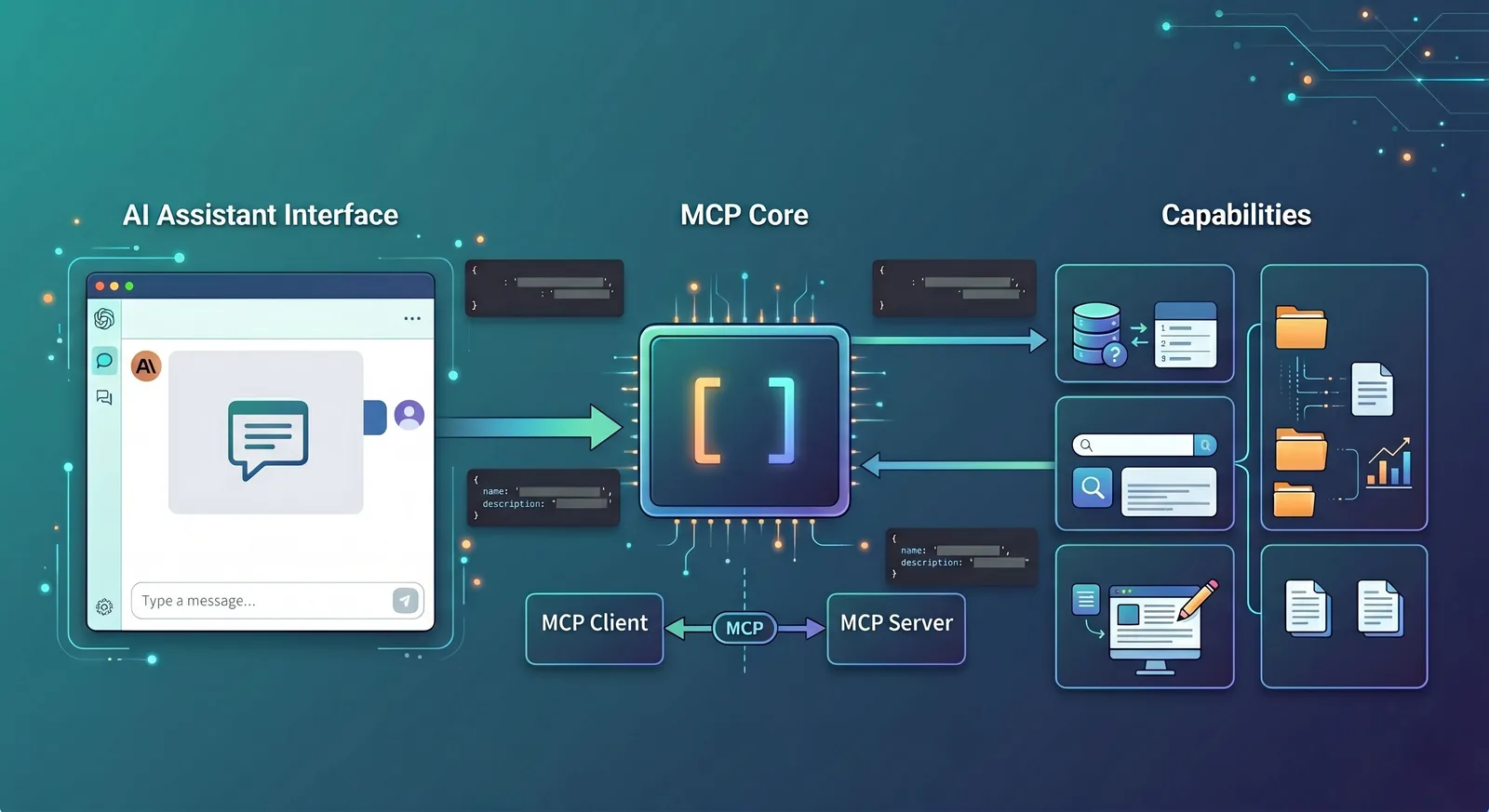
Many frontend engineers feel confused the first time they hear about MCP. The name sounds like a protocol, the content feels like agents, and people keep mentioning tools, prompts, resources, and skills. You do not need to digest all of those terms at once; the key idea is simple: MCP is a standard way to let AI connect to tools, fetch data, and actually get things done.
If you think of large language models in the past as coworkers who could only talk, then connecting them via MCP gives them the ability to check systems, call APIs, and read files. They no longer just answer questions; within a safe, authorized scope, they can help you perform real operations. That is one major reason MCP is being adopted by more and more AI development tools.
What is MCP
MCP stands for Model Context Protocol. It is an open protocol used to connect LLM-based applications with external data sources, tools, and system capabilities.
In frontend terms, HTTP solves how the browser talks to the server; MCP solves how an AI application talks to tools, resources, and contextual data.
The official architecture describes three communication roles: Host, Client, and Server. The Host is the LLM application that initiates the connection, the Client is the connector inside the Host, and the Server provides tools and contextual capabilities.
This design is very close to what frontend engineers already know as “host app + SDK + backend service.” You can think of it this way: the Host handles the UI and the model, the Client handles protocol-level communication, and the Server actually provides the capabilities.
A concrete example first
Imagine you have built an admin dashboard with an AI assistant in the bottom-right corner. A user asks: “How many new orders were created today?”
Without MCP, the assistant usually stays at the pure chat level. It might guess an answer based on training data, or you need to hand-roll a function-calling format and manually wire in database APIs and permission logic.
With MCP, the flow is much cleaner. The AI assistant first asks an MCP server: “What tools do you have?” The server returns a list like get_today_orders, get_order_detail, and export_report, each with a description and an input schema.
Then the model reads the user question and decides to call get_today_orders. The server queries the database, sends the result back to the AI, and the AI replies in natural language: “There were 128 new orders today.” This is a textbook MCP interaction: discover tools, call tools, and then turn the result into something the user understands.
Who are Host, Client, and Server
These three terms often appear together, but they are not complicated. Think of a food delivery platform: the Host is like the delivery app, the Client is the dispatching system inside the app, and the Server is the restaurant that actually cooks.
In MCP:
The Host is the AI app you see, such as Claude Desktop, Claude Code, an IDE extension, or your own web-based AI UI.
The Client is the layer inside the Host that speaks MCP to the outside world.
The Server is the provider of real capabilities, such as a logging service, file-system adapter, database query service, or GitHub integration.
For a developer-oriented scenario: imagine using an AI coding assistant in VS Code and asking it “Show me which API in this project times out the most.” The AI panel in VS Code is the Host, its protocol layer is the Client, and the systems that can access logs, source code, and monitoring data are MCP servers.
Tools are the first thing you should understand
In MCP, the most important concept is not prompts or resources, but tools. Most experiences where “the AI actually does something” start with tools.
You can think of a tool as an API endpoint designed for the AI to call. It usually has three parts: a name, a description, and an input schema describing the parameter structure.
For example, a weather tool might look like this:
name:
get_weatherdescription: get the current weather for a city
input schema: a required
locationfield of type string.
When the client calls it, it sends a tools/call request containing the tool name and the arguments. This call pattern is exactly what the official tools specification and examples describe.
A more frontend-flavored example: you build a content management console and expose three tools to the AI assistant:
search_articles: search articles by keywordget_article_detail: fetch an article’s detailspublish_article: publish an article
Now if the user says, “Find the latest draft with MCP in the title and publish it,” the AI can first search the list, then fetch the chosen article, and finally call the publish tool. In other words, you are exposing a set of backend APIs to be orchestrated by the model.
Why schemas matter
Many people first look at MCP and think “tool name + description” is enough. Why bother with schemas? The reason is that models cannot safely guess parameters; they need a clear contract.
Suppose you implement a create_user tool. Without a schema, the model does not know whether email is required, or whether age should be a number or a string. With a schema, both the model and the client know exactly how to construct arguments. On the frontend side, you can even auto-generate debug forms and TypeScript types from the schema, very similar to working from a Swagger/OpenAPI spec.
This is one reason MCP is friendly to frontend engineers: it is not a “prompt-only, guess-the-format” approach. It encourages capabilities to be structured, explicit, and verifiable.
How a full call actually happens
Let’s revisit a simple scenario: the user types “How many new users signed up today?” into the AI assistant.
The Host knows it is connected to one or more MCP servers, for example an analytics server that provides a
get_signup_counttool.The Client calls
tools/liston that server and learns thatget_signup_countexpects adateparameter of type string.The model decides that this question requires
get_signup_count, so the client sends atools/callrequest with arguments like{ "date": "2026-05-03" }.The server queries its database or analytics backend, returns a value such as
356, and the Host turns that into: “There were 356 new signups today.”
The key point is that the model never directly touches the database. It always goes through a clearly defined tool. This makes permission checks, security, auditing, and error handling much easier to manage.
Resources and prompts: just know what they are for
Besides tools, MCP frequently mentions resources and prompts. They are useful but not essential to master at the very beginning.
A resource is “material for the model to read,” not an action. Recent error logs, the currently open file, a project README, or database schema docs are all good examples. They give the model context without executing anything.
For instance, if a user asks “Why does this API keep timing out?”, the AI might not immediately call a lot of tools. Instead, it might first read a log resource and a code resource, then reason about the issue. Official examples of prompts and resources show exactly this pattern of providing logs and source files together.
A prompt, in MCP terms, is a reusable task template. You might define a git-commit prompt that takes code changes and returns a clean commit message, or an explain-code prompt specialized for explaining code snippets.
If you want a simple mental model: tools are “buttons that do things,” resources are “documents the model can read,” and prompts are “prebuilt work templates.”
Why frontend benefits so much
The biggest benefit for frontend is not “now you can write protocols,” but that the interaction model changes.
Previously, the AI assistant on a page usually had a single input box and could do very little. With MCP, the frontend can surface much more context: which tools the AI currently has, which tool it is about to call, why it needs certain permissions, what the call result was, and where things failed if something went wrong.
That turns the AI from a black-box chat widget into an observable and controllable workbench. In admin dashboards, IDEs, and internal tools, users often want to see what the AI did, not just receive a mysterious final answer.
A very concrete example: you build a log analysis page. When a user clicks on a specific error log entry, the AI assistant on the right automatically gets context such as the current service name, the error time window, the selected log snippet, and the current branch name.
Then the user simply says, “Help me analyze the cause.” The AI can first read the log resource, then call tools like search_recent_deploys and get_error_rate, and finally return a grounded explanation. The improvement here comes not from a “smarter” model, but from the frontend turning UI state into structured context the model can use.
Where MCP sits today
From 2025 to 2026, the hottest topics have been skills, workflows, and agent orchestration. MCP does not show up in headlines as often as it did when it first launched. But from an engineering perspective, even when skills are in the spotlight, MCP is still doing a lot of the backstage work.
A concrete analogy makes this clearer:
A skill is like a scripted refund-handling playbook in customer support: confirm the order, check payment status, verify risk flags, then decide on the outcome.
MCP is like the integration layer behind the support system: connecting to the order service, payment service, and risk engine so that every “go check X” step has an actual tool to call.
In development terms:
A skill can define “how to perform a code review”: look at the diff, inspect tests, examine error logs, then summarize findings.
The actual steps of fetching diffs, querying CI, and reading logs are often implemented as MCP tools. The skill decides “in what order to use which tools,” while MCP defines “how those tools are connected, called, and how results are returned.”
So the current picture is roughly this: external marketing and product narratives talk more about how smart and automated skills and workflows are; beneath that, MCP is still the stable “wiring board” that connects the model to business systems, security gateways, databases, and logging platforms.
Even if MCP is not as trendy by name, as long as you are building products where AI must operate real systems and query real data, someone has to handle the protocol layer. In many projects, MCP is exactly that quiet but critical layer.
MCP vs skills
You can sum up the difference in one line: MCP solves “how to connect tools,” and skills solve “how to accomplish tasks.”
Back to the code review assistant example:
If you are worrying about how the AI will access Git diffs, CI results, and lint reports, you are dealing with an MCP concern, because this is about connecting capabilities.
If you are defining what to look at first, which risks to highlight, what output format to use, and when to suggest more tests, you are dealing with a skill concern, because that is designing the procedure.
In real systems they usually work together: MCP connects Git, CI, and logging; skills encode the “code review flow.” For an introductory understanding, it is enough to clearly separate these two layers.
Why it is worth learning
MCP is worth learning not because it is a new buzzword, but because it standardizes the messiest layer in many AI products: discovering tools, describing parameters, passing context, and executing calls.
Once that layer is standardized, frontend engineers no longer have to reinvent a custom “LLM-to-backend” protocol for each new AI project.
More importantly, this standardization makes the frontend role more interesting. The page stops being just an input/output container and becomes a control panel for AI behavior: showing tools, explaining state, presenting plans, asking for authorization, and surfacing results.
That means frontend engineers in AI products are not just “the ones who plug in the SDK,” but active designers of how humans and AI collaborate through the interface.
Conclusion
In one sentence, MCP gives AI applications a unified, reusable, and engineering-friendly layer for connecting to external capabilities.
For frontend engineers, understanding MCP does not require being an AI expert. It only requires treating it as a new kind of protocol layer—a standard way to let the UI, the model, and business systems work together coherently.
Follow on Google
Add HeyBinyang as a preferred source on Google
If you'd like to keep finding my updates through Google, you can mark this site as a preferred source and make it easier to spot in relevant reading flows.
SHARE
Share
Share this article.