code-review-graph: Make AI Code Reviews More Precise and Token-Efficient
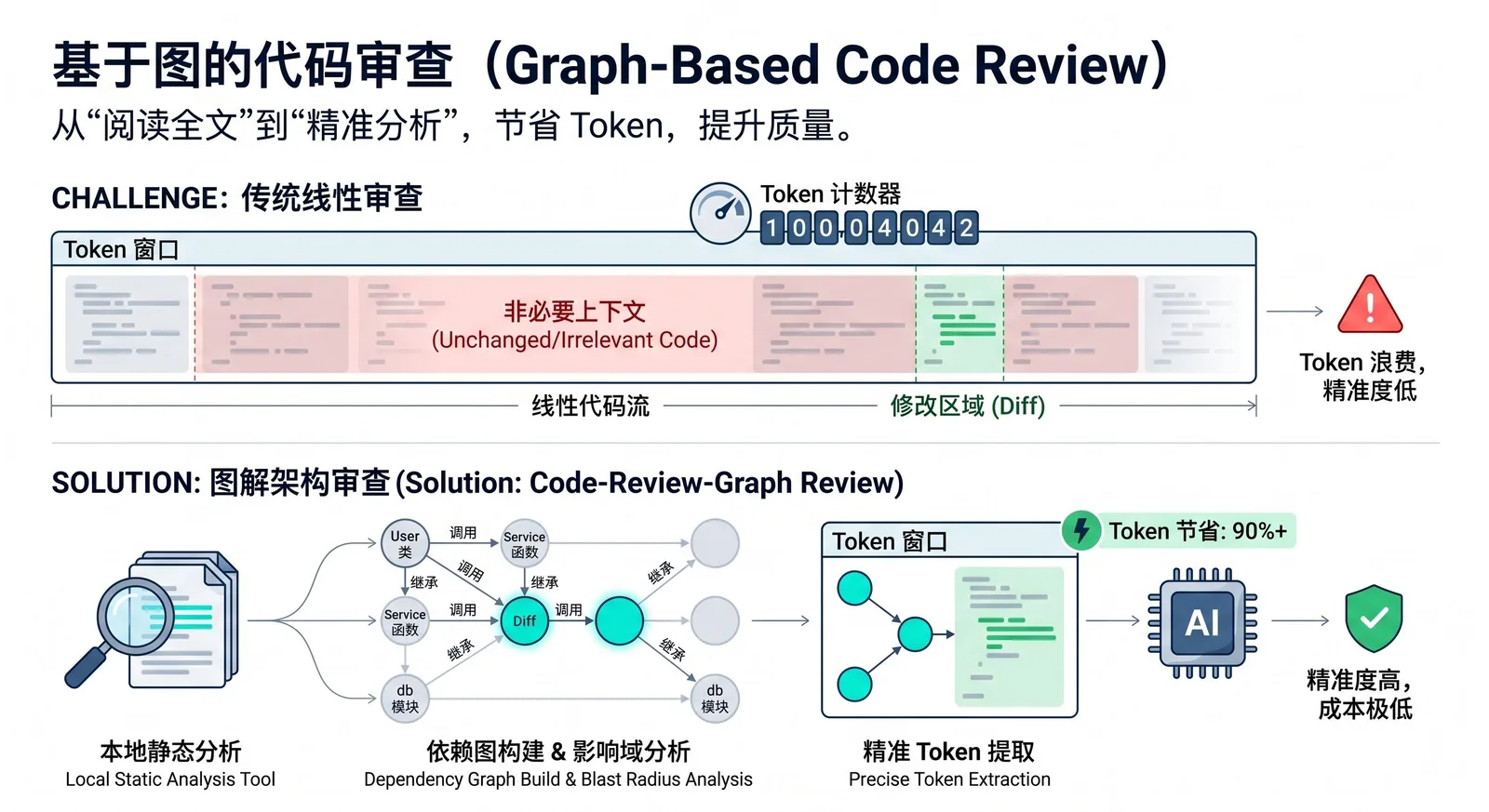
code-review-graph is an open-source tool designed for AI coding assistants. It builds a structured “knowledge graph” of your codebase locally, then feeds only the truly relevant context to the AI, instead of rescanning the entire repository for every task. It uses Tree-sitter to parse ASTs, models functions, classes, imports, call relationships, and tests as a graph, and exposes this graph via MCP to tools like Claude Code, Codex, and Cursor.
What Problems Does It Solve?
Many AI coding tools, when doing code review, impact analysis, or understanding a change, repeatedly read the entire codebase. This leads to significant token waste and higher costs. In a repository with hundreds of files, even if you only modify a single function, the AI might end up scanning a large number of unrelated files, which slows things down, increases contextual noise, and drives up usage.
The core idea of code-review-graph is to pre-model code dependencies so that during review, the AI only reads files that are actually affected by a change, instead of guessing and scanning everything. This capability is called blast-radius analysis: when a file changes, the tool walks outward along call chains, inheritance hierarchies, dependencies, and tests to find all code that might be impacted.
How It Works
The tool first uses Tree-sitter to parse the repository into ASTs and extracts structural information such as functions, classes, imports, call sites, inheritance relationships, and test coverage. It then stores this information in a local SQLite-backed graph. When it is time for review, the AI no longer reads the entire project directly. Instead, it queries the graph to get a minimal relevant context set and reads only the files and nodes that are directly related to the current task.
Incremental updates are supported as well. Subsequent runs only reparse files that have changed, and then refresh related nodes based on hashing and dependency tracking. In a project with roughly 2,900 files, a reindex can be kept within a couple of seconds. For large monorepos, this is especially valuable, because it can shrink tens of thousands of files down to just a handful that genuinely matter for a given change.
Supported Platforms and Tools
code-review-graph integrates into multiple AI coding platforms via MCP. The quickstart and platform docs list support for Claude Code, Codex, Cursor, Windsurf, Zed, Continue, Kiro, OpenCode, Antigravity, Qwen, and Qoder. This means it is not tied to a single AI editor and is instead focused on bringing “graph context” to a variety of coding agents and AI IDEs.
Type | Supported platforms/tools |
|---|---|
Official AI coding tools | Claude Code, Codex, Cursor, Windsurf, Zed, Continue, Kiro |
Other listed platforms | OpenCode, Antigravity, Qwen, Qoder |
Integration method | Exposed via MCP and consumed from supported platforms |
If you only want to configure a single platform, you can explicitly specify its name, for example:
code-review-graph install --platform codex
code-review-graph install --platform cursor
code-review-graph install --platform claude-code
code-review-graph install --platform kiro
How to Use It
The basic workflow is straightforward: install the tool, configure MCP for your AI tools, then go back to your specific project and build the graph.
pip install code-review-graph
code-review-graph install
cd /path/to/your/project
code-review-graph build
There is one subtle but very important detail that is easy to describe vaguely:
code-review-graph installis **not** a “project initialization” command to be run in a project root. It is fundamentally a **global configuration command**. It detects which AI coding tools are installed on your machine, writes the appropriate MCP configuration for them, and injects graph-related capabilities into their rules and settings. After running it, you typically need to restart your editor or tool so the configuration is loaded.In contrast,
code-review-graph build**must** be run in the **project root**. The documentation explicitly says “Then open your project” and asks the AI assistant to build a code review graph for “this project”. The ignore file.code-review-graphignoreis expected at the repository root, and the local graph data is stored inside a.code-review-graph/directory within the project. In other words,installwires the capability into your AI tools, whilebuildactually constructs the graph for the current repository.
To avoid confusion, it helps to present the two commands side by side:
Command | Run in project root? | Purpose |
|---|---|---|
`code-review-graph install` | No, it does not need to run in a project root | Detect installed AI tools on the machine and write corresponding MCP config |
`code-review-graph build` | Yes, run in the target project root | Build a local knowledge graph for the current repo and generate `.code-review-graph/` data |
If your editor does not support hooks, or if you want the graph to stay up to date in the background, you can use the daemon mode. The tool provides commands like crg-daemon add, crg-daemon start, and crg-daemon status to register multiple repositories and automatically watch file changes.
Common Commands
Beyond installation and graph building, code-review-graph exposes a reasonably complete CLI:
Command | Description |
|---|---|
`code-review-graph install` | Automatically detect and configure all supported platforms |
`code-review-graph install --platform <name>` | Configure only a specific platform |
`code-review-graph build` | Fully parse the current codebase and create the graph |
`code-review-graph update` | Perform incremental updates only for changed files |
`code-review-graph watch` | Continuously watch file changes and update the graph |
`code-review-graph visualize` | Generate an interactive HTML graph and export GraphML, SVG, Obsidian vault, or Neo4j Cypher |
`code-review-graph wiki` | Generate a Markdown wiki based on community structure |
`code-review-graph detect-changes` | Run change-impact analysis with risk scoring |
In tools that support slash commands, you can also use:
/code-review-graph:build-graph/code-review-graph:review-delta/code-review-graph:review-pr
to trigger the corresponding workflows directly from the AI assistant.
How Well Does It Work?
The official benchmarks are based on 6 real-world open-source repositories and 13 commits. The results show that, compared to a naive full-read approach, the graph-based mode can reduce token consumption to roughly one-eighth on average, for an overall reduction of about 8.2×. Different repositories see different gains, but most medium-to-large projects show a clearly visible drop.
Project | Token reduction factor |
|---|---|
Gin | 16.4× |
Flask | 9.1× |
FastAPI | 8.1× |
Next.js | 8.0× |
httpx | 6.9× |
Average | 8.2× |
Another key metric is the accuracy of change-impact analysis. The reported recall is 100%, with an average F1 of 0.54 and an average precision of 0.38. This indicates a conservative strategy: it would rather include some extra “possibly affected” files than miss ones that are genuinely impacted.
Metric | Value | Meaning |
|---|---|---|
Recall | 100% | Does not miss actually affected files |
F1 | 0.54 | Balances recall and precision |
Precision | 0.38 | Conservative; may include some extra candidate files |
This approach is not always superior in every scenario. In small projects with very localized changes, the overhead of the graph context itself can sometimes outweigh the cost of reading files directly. In some single-file change tests, the token reduction can even be below 1 (for example around 0.7×), meaning there is little to no gain. In practice, the sweet spot is medium-to-large projects, multi-file changes, complex dependency graphs, and workflows where AI-driven code review is used frequently.
Who Is It For?
Teams that already use tools like Claude Code, Codex, or Cursor in their daily development, and that work on sizable projects with complex module structures and frequent pull request reviews, will benefit the most from code-review-graph. It does not replace code review itself. Instead, it ensures the AI is reading the right parts of the codebase first, so review, debugging, architecture analysis, and onboarding all happen on top of a more accurate context.
For solo projects, very small repositories, or occasional simple changes, the gains may be limited. But for teams that want to systematically reduce AI coding costs, cut down contextual noise, and improve the hit rate of AI-driven code reviews, code-review-graph already delivers very practical value.
Follow on Google
Add HeyBinyang as a preferred source on Google
If you'd like to keep finding my updates through Google, you can mark this site as a preferred source and make it easier to spot in relevant reading flows.
SHARE
Share
Share this article.