MVP Isn't About Settling — It's a Smarter Development Sequence
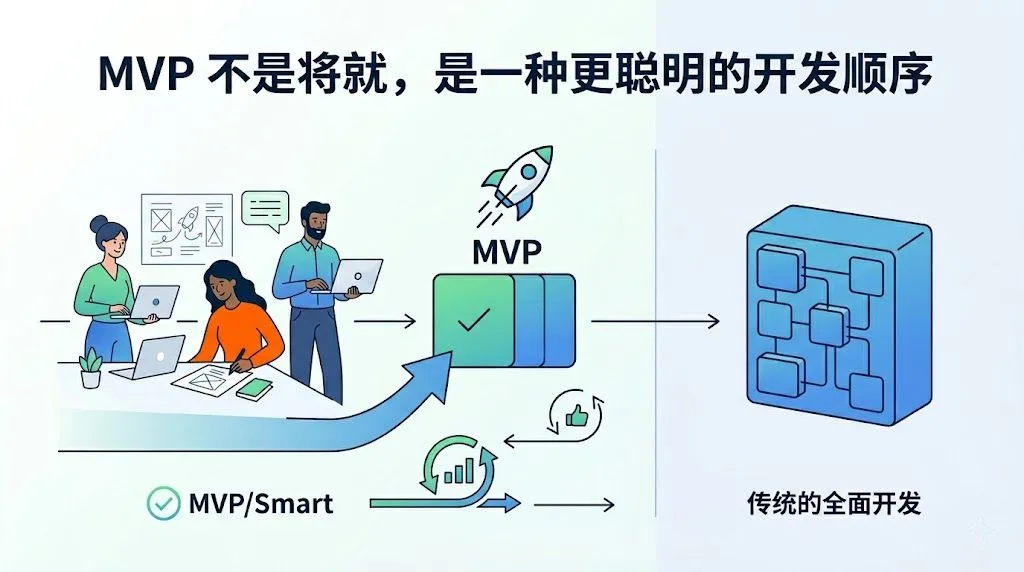
As engineers, we naturally like to “do it all”: design elegant architectures, abstract common components, set up authentication, CI/CD, a complete design system… and as a result, launch time keeps getting delayed.
The MVP (Minimum Viable Product) mindset is essentially about helping you verify whether an idea is worth pursuing at a lower cost.
For developers, it’s not about “writing crappy code,” but about “making the right engineering decision at the right time.”
First, let’s clarify: What is MVP?
A more formal definition: MVP is a product version with the smallest set of features, yet sufficient to deliver to real users and to collect feedback and validate hypotheses.
There are three key points:
It is a truly usable product, not a prototype or PPT.
The goal is “learning” and “validation”, not pursuing a one-time perfect product.
It should obtain as much user behavior feedback as possible with the minimum implementation cost.
Simplified into one sentence: Use the smallest amount of code to confirm one thing—whether anyone actually wants to use this thing.
Core Mindset of MVP Development
From an engineering perspective, the MVP mindset can be broken down into several steps:
Clarify the “one question” to be validated
For example: “Are users willing to use a minimal online note-taking tool instead of continuing to send messages to themselves on WeChat or via email?”
Only keep the features necessary to validate this question
Create a note, display a list, delete one—that’s enough.
Use your fastest path to implement
It doesn’t have to be the “trendiest tech stack,” but the one you know best.
Launch in the smallest scope, observe real usage
First throw it to colleagues and friends around you, then consider public release.
Iterate based on behavior data, not on imagined requirements
See if people come back to use it again, not by listening to them say “It’s good, it’s good.”
A Simple Comparison: Two Common Paths for Engineers
Non-MVP Path (the one we often take):
Design a complete data model and complex relationships from the start
Plan a multi-role, multi-permission system
Set up complete authentication, payment, notifications, logging, monitoring
Finish building a UI component library and theme system
Only open the /signup page for others to see after six months
MVP Path:
Keep only core tables in the data model
Skip registration and login first; use a simple method to distinguish users or just single user
One list page + one creation page
Give it to 5–10 real users to try within a week
Architecture can be added later, but if no one wants to use it, you’ve saved yourself from building an entire “empty city.”
Hands-on: Building a Note-taking MVP with Next.js
Below, we use an “online note/memo” as an example, going through the MVP approach with Next.js (App Router).
1. First, define the MVP scope
Intentionally keep the requirements very small:
User can input a text note in the browser
After clicking save, the note appears on the page
Can delete a note
Data storage uses in-memory or a simple JSON file (or even browser localStorage)
Things not done for now:
User registration/login
Tags, search, rich text, sorting
Cross-device sync, mobile adaptation
Fancy UI
With such a scope, any developer familiar with React can produce a usable version in 1–2 days.
2. Project scaffold and basic structure
Create an App Router project using the official documentation recommended method.
In the terminal:
npx create-next-app@latest note-mvp
# 或者选择 TypeScript、App Router 等默认选项
cd note-mvp
npm run dev
In the directory structure, the app/ directory is core. [nextjs](https://nextjs.org/docs/app)
We can arrange the minimal structure like this:
app/page.tsx: Home page, displays note list and creation formapp/api/notes/route.ts: A simple API for creating/retrieving/deleting notes (using in-memory or simple storage) [nextjs](https://nextjs.org/docs/app)
3. Write a minimal API with App Router
In app/api/notes/route.ts, first use an in-memory array to simulate storage (in a real environment, you can switch to SQLite / Supabase, etc.).
// app/api/notes/route.ts
import { NextResponse } from 'next/server'

type Note = {
  id: string
  content: string
  createdAt: string
}

let notes: Note[] = []

export async function GET() {
  return NextResponse.json(notes)
}

export async function POST(request: Request) {
  const { content } = await request.json()
  if (!content || typeof content !== 'string') {
    return new NextResponse('Invalid content', { status: 400 })
  }

  const note: Note = {
    id: crypto.randomUUID(),
    content,
    createdAt: new Date().toISOString(),
  }

  notes.unshift(note)
  return NextResponse.json(note, { status: 201 })
}

export async function DELETE(request: Request) {
  const { searchParams } = new URL(request.url)
  const id = searchParams.get('id')
  if (!id) {
    return new NextResponse('Missing id', { status: 400 })
  }

  notes = notes.filter((n) => n.id !== id)
  return new NextResponse(null, { status: 204 })
}
This code has many “could be optimized” points, such as:
Data is only in memory, lost when process restarts
No concurrency safety, no authentication
But in the MVP stage, it already meets the goal of “validating: someone is willing to write something and come back to see it.”
4. Write a simple page
In app/page.tsx, use a Client Component to handle interactions.
'use client'

import { useEffect, useState } from 'react'

type Note = {
  id: string
  content: string
  createdAt: string
}

export default function Home() {
  const [notes, setNotes] = useState<Note[]>([])
  const [input, setInput] = useState('')
  const [loading, setLoading] = useState(false)

  useEffect(() => {
    fetch('/api/notes')
      .then((res) => res.json())
      .then((data) => setNotes(data))
  }, [])

  async function handleAdd(e: React.FormEvent) {
    e.preventDefault()
    if (!input.trim()) return

    setLoading(true)
    try {
      const res = await fetch('/api/notes', {
        method: 'POST',
        headers: { 'Content-Type': 'application/json' },
        body: JSON.stringify({ content: input.trim() }),
      })
      const note: Note = await res.json()
      setNotes((prev) => [note, ...prev])
      setInput('')
    } finally {
      setLoading(false)
    }
  }

  async function handleDelete(id: string) {
    await fetch(`/api/notes?id=${id}`, { method: 'DELETE' })
    setNotes((prev) => prev.filter((n) => n.id !== id))
  }

  return (
    <main style={{ maxWidth: 600, margin: '2rem auto', padding: '0 1rem' }}>
      <h1>Minimal Notes MVP</h1>

      <form onSubmit={handleAdd} style={{ marginBottom: '1rem' }}>
        <textarea
          value={input}
          onChange={(e) => setInput(e.target.value)}
          rows={3}
          style={{ width: '100%', marginBottom: '0.5rem' }}
          placeholder="写点什么..."
        />
        <button type="submit" disabled={loading}>
          {loading ? '保存中...' : '保存'}
        </button>
      </form>

      <section>
        {notes.length === 0 && <p>还没有任何笔记。</p>}
        {notes.map((note) => (
          <article
            key={note.id}
            style={{
              border: '1px solid #ddd',
              padding: '0.75rem',
              marginBottom: '0.75rem',
            }}
          >
            <p style={{ whiteSpace: 'pre-wrap' }}>{note.content}</p>
            <small style={{ color: '#666' }}>
              {new Date(note.createdAt).toLocaleString()}
            </small>
            <div>
              <button
                onClick={() => handleDelete(note.id)}
                style={{ marginTop: '0.25rem' }}
              >
                删除
              </button>
            </div>
          </article>
        ))}
      </section>
    </main>
  )
}
This page is very “plain”: a textarea, a button, and a list.
But it already completes a full loop:
User can create a note
Can see their historical notes
Can delete unwanted ones
From an MVP perspective, this is enough to give to 5–10 test users to try and see their real behavior.
What MVP thinking does this Next.js MVP example embody?
Looking back at this implementation, we can see:
Tech stack is simple enough
No extra state management libraries, UI frameworks, or complex backend services introduced.
Architecture allows future expansion
Although it uses in-memory storage now, the API path is fixed, and switching to a database in the future only requires changing the implementation in the route.
Features are just enough to validate one core question
“Would someone be willing to write a short note in the browser and come back to the same place to view/delete it?”
Cost is controllable
For an engineer familiar with Next.js, this MVP-level implementation can be completed and deployed to Vercel within a day.
From this starting point, you can decide the next steps based on user behavior, for example:
If users heavily request “want to search,” then consider adding search
If people complain “can’t see it on another device,” then add persistent storage and login
If you find that no one comes back a second time, then you may need to reexamine the need itself
Common Pitfall: Treating “Engineering Perfection” as the Goal
In real projects, many engineers regard this kind of MVP as a “temporary toy” and can’t get past it mentally:
“I don’t want to write such a crude implementation; I’ll have to refactor it twice later”
“Launching without authentication is too unprofessional”
“I feel uneasy not using some best-practice framework”
Here are two practical considerations:
If validation shows “no one uses it,” you’ve already saved all subsequent refactoring costs
If validation shows “someone actually uses it,” then you have at least one set of real requirements and behavior data to support engineering-level optimization
MVP does not deny engineering quality, but places “high-quality engineering” after the need is proven valid.
Final Thoughts: MVP Mindset for Engineers
You can think of the MVP mindset as a kind of engineering risk management:
Before users prove “it’s worth building a castle for them,” a tent is enough
You can completely use a modern framework like Next.js to build a “tent,” rather than directly constructing a castle
For experienced developers, a practical approach is:
First use your most familiar stack (e.g., Next.js + a simple database) to create a “skeleton that works”
Find 3–10 real users and observe their behavior for a month
Only perform architecture upgrades for “things proven important by real behavior”
Follow on Google
Add HeyBinyang as a preferred source on Google
If you'd like to keep finding my updates through Google, you can mark this site as a preferred source and make it easier to spot in relevant reading flows.
SHARE
Share
Share this article.