A Frontend Engineer's Guide to Getting Started with MCP
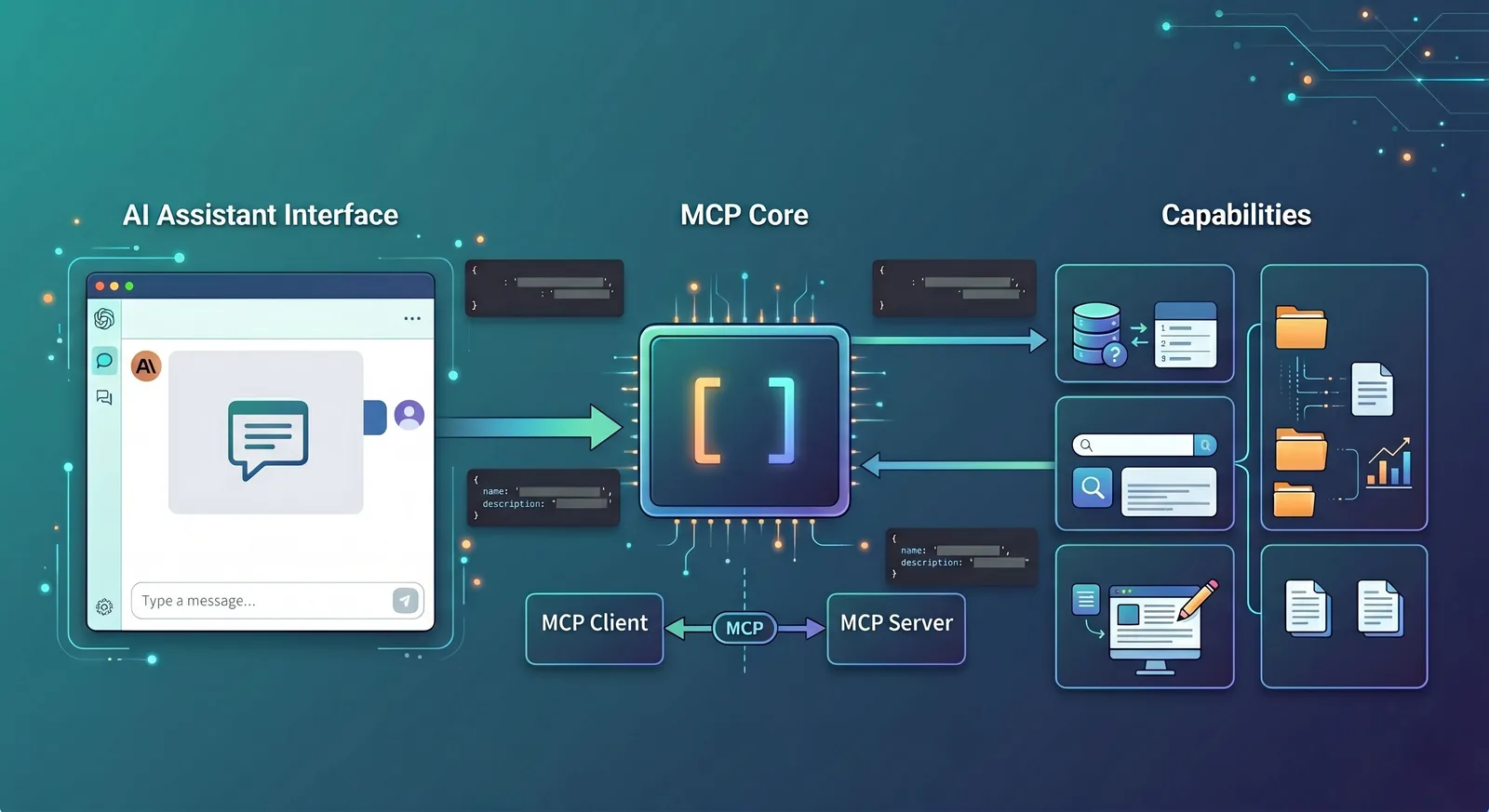
Many frontend engineers feel a bit confused when first encountering MCP: the name sounds like a protocol, the content feels like an Agent, and discussions always involve Tool, Prompt, Resource, Skill. Actually, you don't need to memorize all the terms at the beginning. Just grasp one key point: MCP is a standardized way for AI to connect to tools, access data, and actually get things done.
If you think of the previous large language model as a colleague who can only talk, after integrating MCP, it can gain the ability to query systems, call APIs, and read files. It no longer just answers questions; it can also perform operations within authorized scope on your behalf. This is one of the important reasons why MCP is being adopted by more and more AI development tools.
What is MCP
MCP stands for Model Context Protocol, an open protocol used to connect LLM applications with external data sources, tools, and system capabilities.
If you understand it in a way familiar to frontend developers: HTTP solves how browsers communicate with servers, while MCP solves how AI applications communicate with tools, resources, and context.
The official architecture documentation divides communication roles into Host, Client, and Server: Host is the LLM application that initiates the connection, Client is the connector inside the Host, and Server is the provider of tools and context capabilities.
This design is very close to the "host application + SDK + server" pattern familiar to frontend developers. You can think of it as: Host handles the UI and the model, Client handles communication according to the protocol, and Server actually provides the capabilities.
Let's look at a most intuitive example first
Suppose you built an admin system with an AI assistant in the bottom right corner. The user asks: "How many new orders were placed today?"
Without MCP, this assistant can usually only stay at the chat level: either guess a result based on training data, or you have to write an additional set of tool call formats, hardcoding the database query interface and permission logic.
With MCP, the flow becomes much clearer. The AI assistant first asks a certain MCP Server: "What tools do you have?" The server returns a list of tools, such as get_today_orders, get_order_detail, export_report, each with a description and parameter schema.
Then, after seeing the user's question, the model chooses to call get_today_orders. The server queries the database, returns the result to the AI, and the AI replies in natural language: "128 new orders today." This is the most typical usage of MCP: first discover tools, then call tools, then organize the results into a user-understandable response.
Who exactly are Host, Client, and Server?
These three terms often appear together, but they are not difficult. You can use a "food delivery platform" as an analogy: Host is like the delivery app, Client is like the scheduling system within the app, and Server is like the merchant that actually prepares the food.
In MCP:
Host is the AI application you directly see, such as Claude Desktop, Claude Code, an IDE plugin, or a web AI page you built yourself.
Client is the layer inside the Host responsible for communicating with the outside world according to the MCP protocol.
Server is the party that actually provides capabilities, such as a logging service, filesystem adapter, database query service, or GitHub tool service.
Here's a development scenario. Suppose you use an AI coding assistant in VS Code and ask it: "Check which API endpoint in the current project has the most timeouts." At this point, the AI assistant in VS Code is the Host, the internal component handling protocol communication is the Client, and the capability providers that access logs, code repositories, and monitoring platforms are MCP Servers.
Tool is the first thing you should understand
The most important thing in MCP is not Prompt or Resource, but Tool. Because most experiences where "AI actually starts doing things" begin with Tools.
You can think of a Tool as an "interface for AI to use." It usually contains three things: the tool name, a description of its purpose, and a parameter schema, i.e., the structural definition of parameters.
For example, a weather tool might look like this:
name:
get_weatherdescription: Query the current weather of a city
input schema:
location, type is string, and required.
When the client calls it, it sends the tool name and parameters via a request like tools/call. The official tool specification and examples all follow this pattern.
Let's give another example closer to frontend. You built a content admin panel and connected three tools to the AI assistant:
search_articles: Search articles by keyword.get_article_detail: Get article details.publish_article: Publish an article.
This way, if the user says "Find drafts with 'MCP' in the title and publish the latest one," the AI can first search the list, then get details, then call the publish interface. You'll notice that this is essentially exposing a set of backend APIs for the model to combine and call.
Why schema is important
Many people, when first seeing MCP, think "tool name + description" is enough, and wonder why a schema is needed. The reason is simple: the model doesn't call tools by guessing; it needs a clear parameter contract.
For example, if you write a create_user tool without a schema, the model might not know whether email is required, or whether age should be a number or a string. With a schema, both the model and the client know exactly how to construct parameters; frontend developers can also generate debug forms or type definitions based on these structures, which is very similar to the experience of debugging APIs with Swagger documentation.
This is also why MCP is friendly to frontend engineers. It is not a guesswork approach based solely on prompts, but rather strives to make tool capabilities structured, explicit, and verifiable.
How does a complete call actually happen?
Let's use a simple scenario: the user types in the AI assistant: "Check how many new users registered today."
First, the Host knows which MCP Servers it is connected to, e.g., an analytics server. This server exposes a tool called get_signup_count.
Second, the Client gets the tool definition via tools/list, and learns that this tool requires a date parameter of type string.
Third, the model determines that this question requires calling get_signup_count, so the client sends a tools/call request, with parameters like { "date": "2026-05-03" }.
Fourth, the Server queries the database or analytics service, returns the result, e.g., 356. Then the Host organizes this result into a user-facing message: "356 new users registered today."
The key point of this process is: the model does not directly operate the database; it always accomplishes actions indirectly through a well-defined tool. This makes permission, security, auditing, and error handling much easier.
Resource and Prompt: just know what they are for now
Besides Tool, MCP also frequently mentions Resource and Prompt. They are indeed useful, but you don't need to study them deeply at the beginner stage.
Resource is more like "material for the model to read," not necessarily an executable action. For example, error logs from the past hour, the content of the currently open file, a project's README, or a database table structure description—all these can be provided to the model as Resources for reference.
For instance, if the user asks "Why is this API always timing out?" the AI might not need to immediately call many tools; instead, it could first read a log Resource and a code Resource, then analyze the problem. The official examples of prompts and resources demonstrate this usage of providing logs and code files together to the model.
Prompt, on the other hand, is more like a reusable task template. For example, provide a git-commit prompt that takes code changes as input and outputs a uniformly styled commit message; or an explain-code prompt specifically for explaining a piece of code.
If you want to remember the simplest distinction: Tool is a "button that can do things," Resource is "material for the model to read," and Prompt is a "common work template."
Why frontend will benefit significantly
The biggest benefit for frontend is not "being able to write the protocol," but that the interaction pattern will change.
Previously, an AI assistant on a page usually only had an input box and could do very limited things. Now, if MCP is connected in the background, the frontend can explicitly display many things: what tools the AI has, which tool it is about to call, why it is requesting a certain permission, what the call result is, which step failed.
This makes AI products more like "observable, controllable workbenches" rather than black-box chat windows. Especially in scenarios like admin systems, IDEs, and internal tools, users usually prefer to see what the AI actually did, rather than just receive a mysterious answer.
Let's give another example close to a frontend workflow. You build a log analysis page. When a user clicks on an error log, the AI assistant on the right automatically receives these contexts: current service name, error time range, selected log snippet, current repo branch name.
Then the user simply says: "Analyze the cause for me." At this point, the AI can first read the log Resource, then call tools like search_recent_deploys, get_error_rate, and finally return a more reliable analysis. The key to this experience is not that the model is smarter, but that the frontend converts the UI state into usable context for the model.
Where is MCP now?
Since 2025-2026, what has been most discussed in the community are various Skills, Workflows, and Agent orchestration. MCP's buzz might not be as high as when it first came out. But from an engineering perspective, no matter how popular Skills are, behind the scenes, it's often MCP doing the heavy lifting.
A concrete example makes it clear:
A Skill is like a set of scripts and workflows for "customer service handling refunds": first confirm the order, then check payment status, then verify risk control, and finally give the processing result.
MCP is like the "unified interface layer behind the customer service system," connecting order services, payment services, risk control services, so that each step of "go check it" has a corresponding tool to call.
The same applies to development scenarios:
A Skill can define "how to do a code review": first look at the diff, then check tests, then check error logs, and finally generate review comments.
The actual actions of fetching diffs, checking CI, and reading logs are typically done through tools exposed by MCP; the Skill is responsible for "in what order to use which tools," while MCP is responsible for "how these tools are connected, called, and how results are retrieved."
So the current landscape is more like: external marketing and product selling points focus more on how smart Skills are and how automated the processes are; but at the bottom level, in the code, MCP is still the stable "patch panel" that connects models with various business systems, security gateways, databases, and log platforms.
Its name may not be as hot as Skill, but if you are building a product that "lets AI actually operate systems and query real data," someone has to bear the protocol layer, and MCP plays that quiet but critical role in many projects.
The difference between MCP and Skill
If we distinguish them in one sentence: MCP solves "how tools are connected," Skill solves "how tasks are done."
Take the "code review assistant" example again.
If you care about: how to let AI access Git diff, how to query CI results, how to read lint reports, then you are facing an MCP problem, because these all belong to "connecting capabilities in."
But if you care about: what to look at first in a code review, which risks to prioritize, in what format to output the result, under what circumstances to suggest adding tests, then that is more of a Skill problem, because it defines "how this thing should be done."
In reality, the two usually work together. MCP is responsible for connecting Git, CI, log platforms, while Skill is responsible for solidifying the "code review process." But as an introductory understanding, just clearly distinguishing this boundary is enough.
Why is it worth learning?
MCP is worth learning not because it is a new buzzword, but because it standardizes the layer that is most prone to chaos in AI product development: tool discovery, parameter description, context passing, and execution calling.
Once this layer is standardized, frontend engineers don't have to reinvent a "protocol for how the model connects to backend capabilities" every time they build a new AI product.
More importantly, this standardization makes the boundaries of frontend responsibilities more interesting. The page is no longer just a container for input and output, but gradually becomes a console for AI behavior: displaying tools, explaining states, presenting plans, requesting permissions, and feeding back results.
This allows frontend engineers not only to "integrate an SDK" in AI products, but to truly participate in defining the interaction mode of human-AI collaboration.
Conclusion
If summed up in one sentence, the value of MCP is: it provides AI applications with a relatively unified, reusable, and engineering-oriented "external capability access layer" for the first time.
For frontend engineers, understanding it does not require becoming an AI expert first, but just thinking of it as a new protocol layer—a standard connection method that enables collaboration among UI, models, and business systems.
Follow on Google
Add HeyBinyang as a preferred source on Google
If you'd like to keep finding my updates through Google, you can mark this site as a preferred source and make it easier to spot in relevant reading flows.
SHARE
Share
Share this article.