code-review-graph: More Precise AI Code Review with Fewer Tokens
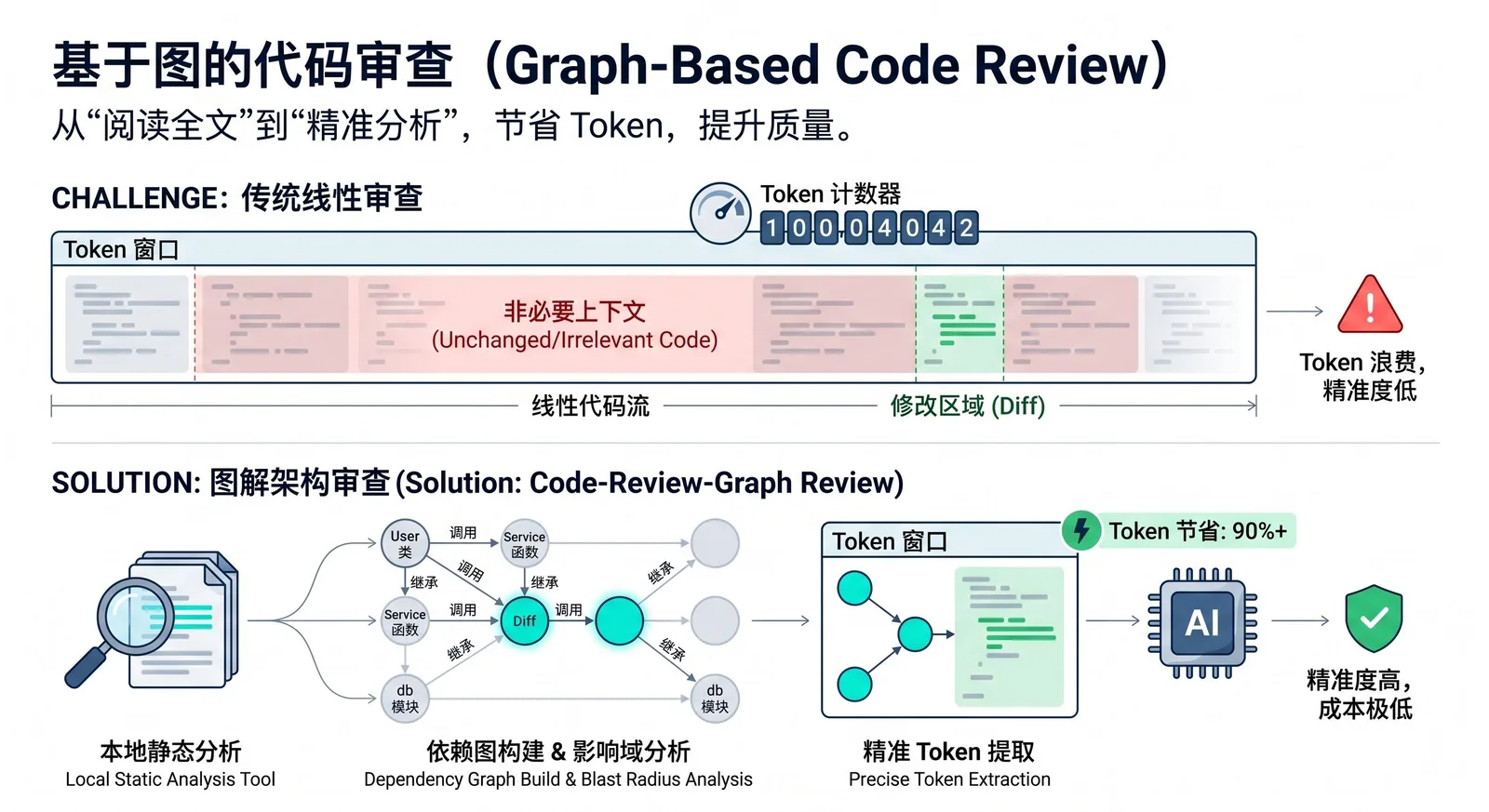
code-review-graph is an open-source tool for AI coding assistants. It first builds a structured "knowledge graph" of the codebase locally, then passes only the truly relevant context to the AI, avoiding a full scan of the entire repository for each task. It uses Tree-sitter to parse AST, organizes functions, classes, imports, call relationships, and test relationships into a graph structure, and then provides it to tools like Claude Code, Codex, and Cursor via MCP.
What problem does it solve?
Currently, many AI coding tools repeatedly read the entire codebase when performing code review, scoping impact, or understanding changes, leading to significant token waste and increased costs. In a repository with hundreds of files, even if only one function is modified, the AI may need to rescan many irrelevant files, resulting in slower speed, increased context noise, and higher expenses.
The idea behind code-review-graph is to model "code dependencies" in advance, so that during review, the AI only reads the files actually affected by the change, rather than guessing and doing a full scan. The official documentation calls this capability blast-radius analysis: when a file changes, the tool traces outward along the chains of calls, inheritance, dependencies, and tests to find all potentially affected code.
How does it work?
The tool first uses Tree-sitter to parse the repository into an AST, extracting structural information such as functions, classes, imports, call sites, inheritance relationships, and test coverage, and then stores this information in a local SQLite graph database. During the review phase, the AI no longer reads the entire project directly; instead, it queries the graph to obtain a minimal set of context, reading only the files and nodes directly relevant to the current issue.
It also supports incremental updates. According to the official documentation, subsequent updates only re-parse changed files and refresh related nodes via hashing and dependency tracking; in a project with about 2,900 files, re-indexing can be completed within 2 seconds. This approach is especially valuable for large repositories like monorepos, as it can narrow down from tens of thousands of files to just a dozen or so that actually need to be read.
Supported platforms and tools
code-review-graph integrates with various AI coding platforms via MCP. The supported platforms listed in the official quickstart and platform documentation include Claude Code, Codex, Cursor, Windsurf, Zed, Continue, Kiro, OpenCode, Antigravity, Qwen, and Qoder. This means it is not limited to a single AI editor, but aims to bring the "graph context" capability to different coding agents or AI IDEs.
Type | Supported platforms/tools |
|---|---|
Official AI coding tools | Claude Code, Codex, Cursor, Windsurf, Zed, Continue, Kiro |
Other listed platforms | OpenCode, Antigravity, Qwen, Qoder |
Integration method | Integrated via MCP, calling graph capabilities in supported platforms |
If you want to install only for a specific platform, you can also explicitly specify the platform name, for example code-review-graph install --platform codex, code-review-graph install --platform cursor, code-review-graph install --platform claude-code, or code-review-graph install --platform kiro.
How to use
The basic usage flow is simple: first install, then write the MCP configuration into the AI tool, and finally go back to the specific project to build the graph.
pip install code-review-graph
code-review-graph install
cd /path/to/your/project
code-review-graph build
Here is a very important point that is often ambiguous: code-review-graph install is not a "project initialization command" executed in the project root; it is essentially a global configuration command. The official documentation clearly states that this command automatically detects the AI coding tools installed on your machine, writes the corresponding MCP configuration, and injects graph-related instructions into the rule configuration of those platforms; after execution, you need to restart the corresponding editor or tool.
In contrast, code-review-graph build should be executed in the project root command. The official instructions say "Then open your project", and then have the AI assistant build the code review graph for "this project"; at the same time, the tool's ignore file .code-review-graphignore is also explicitly required to be placed in the repository root, while the local graph data is stored in the project's .code-review-graph/ directory. In other words, install is responsible for integrating the capability into your AI tool, and build is responsible for actually building the graph for the current repository.
To avoid confusion, you can also clearly compare the responsibilities of these two commands:
Command | Execute in project root? | Purpose |
|---|---|---|
| No, not required to execute in project root | Detect local AI tools and write corresponding MCP configuration |
| Yes, needs to be executed in the target project root | Build local graph for current repository and generate |
If the editor itself does not support hooks, or if you want the graph to remain continuously up-to-date in the background, you can also use the daemon mode. The official documentation provides crg-daemon add, crg-daemon start, crg-daemon status and other commands to register multiple repositories and automatically watch for file changes.
Common commands
In addition to installation and graph building, the official documentation also provides a relatively complete set of CLI capabilities.
Command | Purpose |
|---|---|
| Automatically detect and configure all supported platforms. |
| Configure only the specified platform. |
| Fully parse the current codebase and create a graph. |
| Perform incremental updates only for changed files. |
| Continuously watch for file changes and automatically update the graph. |
| Generate an interactive HTML graph, also exportable to GraphML, SVG, Obsidian vault, or Neo4j Cypher. |
| Automatically generate a Markdown wiki based on community structure. |
| Perform change impact analysis with risk scoring. |
In tools that support Slash Commands, you can also directly use /code-review-graph:build-graph, /code-review-graph:review-delta, and /code-review-graph:review-pr to invoke the corresponding workflows.
How effective is it?
The official benchmark evaluation is based on 6 real open-source repositories and 13 commits. The results show that compared to naive full reading, the graph mode reduces token consumption to about one-eighth on average, an overall 8.2x reduction. From the public data, the benefits vary across repositories, but most medium to large projects show a significant decrease.
Project | Token reduction factor |
|---|---|
Gin | 16.4× |
Flask | 9.1× |
FastAPI | 8.1× |
Next.js | 8.0× |
httpx | 6.9× |
Average | 8.2× |
Another key metric is impact analysis accuracy. The official results show a recall rate of 100%, an average F1 of 0.54, and an average precision of 0.38. This indicates a conservative strategy: it prefers to suggest more "potentially affected" files rather than missing dependencies that could actually be impacted.
Metric | Value | Meaning |
|---|---|---|
Recall | 100% | Does not miss truly affected files |
F1 | 0.54 | Combined measure of recall and precision |
Precision | 0.38 | Tends to be conservative, may include more candidate files |
However, this approach is not always advantageous. The official documentation explicitly mentions that in smaller projects with very localized changes, the context overhead of the graph metadata itself may be greater than the cost of directly reading files. For example, in a single-file change test for Express, the reduction was only 0.7x. Therefore, the most suitable scenarios remain medium to large projects, multi-file changes, complex dependency relationships, and high-frequency AI review workflows.
Which teams is it suitable for?
If a team has already integrated Claude Code, Codex, Cursor, or similar tools into their daily development workflow, and the project is large with complex module relationships and frequent PR reviews, then the value of code-review-graph will be quite direct. It is essentially not a replacement for code review, but rather helps the AI get "what to read" right first, so that subsequent review, debugging, architecture analysis, and onboarding are built on more accurate context.
For single-person projects, very small repositories, or occasional simple changes, it may not always bring significant benefits. But for teams that want to systematically reduce AI coding costs, reduce context noise, and improve code review hit rates, it has already demonstrated quite practical effects.
Follow on Google
Add HeyBinyang as a preferred source on Google
If you'd like to keep finding my updates through Google, you can mark this site as a preferred source and make it easier to spot in relevant reading flows.
SHARE
Share
Share this article.